

Showing posts with label Google. Show all posts
Showing posts with label Google. Show all posts
August 9, 2014
What is PayBux - Scam of Not?
Labels:
Google

April 19, 2014
Remote your Desktop using Google Chrome
Labels:
Google

It's always been an easy task for me if I can take over the computer and do some technical stuff, if the user is not technical enough to troubleshoot or fix some issue. Remote desktop sharing is very convenient and save both of your time. Technology makes our life easy and for me having this kinds of tool makes my life much easier. I was looking for a remote desktop software for free, easy to use and interface friendly and here's what I got from Google Chrome. Chrome Remote Desktop
September 4, 2013
Latest Android OS - Android 4.4 Kitkat
Labels:
Google

Google announce that the next version of Android OS will be called KitKat. Yes, the famous chocolate bar Kitkat from Nestle. It will be the codename for the Android 4.4 OS. Android started with different code name that are easy to remember and Kitkat is the latest one. JellyBean is a candy and now a chocolate bar. Jelly Bean give us a better user experience and people will wait what KitKat can offer. Major changes from Ice Cream Sandwich to JellyBean
July 19, 2013
How to Connect to Wifi from your Android device.
Labels:
Google,
Mobile Phone

The first word that came out on my mind when I got an Android device was “cool” amazing feature and touchscreen smartphone. I’m used to old style classic keypads from Nokia and having a touch screen Android device is the next big thing. Android evolves to different version and as far as I know it has eight Operating system release let me check if I still remember the names. First one is Cupcake, Donut, Éclair , Froyo, Gingerbread , Honeycomb, Ice Cream Sandwich and the latest on Jelly Bean. Okay we know
July 12, 2013
Samsung Galaxy S4 No Outbound Calls White Screen issue
Labels:
Globe,
Google,
Mobile Phone

My friend got a new Samsung Galaxy S4 and he is pretty excited about the new phone and downloaded and install bunch of application on it. The phone runs perfectly until he try to call someone. He told me that when he is calling or making an outbound call it just show a blank white screen. Basic troubleshooting is done like restarted the phone several times, removed reattached the SIM and SD card, check the settings but it looks like normal. I ask him if he try to use the phone when no application was installed and he told me
July 8, 2013
Google Working on Video game Console

If Internet Giant Google will create a game
console what would we expect. We all know Google owns Android and Android app
provides good and high quality game but what if they focus on Game Console if
the rumor is true will they compete with Apple TV since Apple might release a
gaming console as well. It seems that Google is making a move to be a top
company when it comes to technology. The question is will Google create the
hardware design of the gaming
June 14, 2013
Chatting in Line Application– Keeps you Online
Labels:
Google,
Mobile Phone

The chat application evolve as new and one of the most
popular apps in Anroid are out Line. There is PATH , WeChat and now Line from
Line Corporation. The application hit a total of 726,185 rating as of posting.
Description on this application is no limits as long as your connected online Call
and Message is free. The application has a more than 170 million user and continues
to grow every day. Ranked as number 1
communication application by 47 countries. The chat or communition improves as
you can send a sticker – A
May 22, 2013
WeChat Popular Chat Application
Labels:
Google,
Google Chrome

I recently posted an application about chat and it’s called Path now we have WeChat. I saw the application on a commercial by the two popular Television host Drew Arellano and Iya Villania . A free texting, voice messaged and video calls in your pocket. The app features a clear voice messages the two television host is chatting but using the voice command. It also has group chats and animated smileys . The good thing about this application is free and available in Android Smartphone. You can download the application https://play.google.com/store/apps/details?
May 21, 2013
Google Calendar will Organize Your Day
Labels:
Apple,
Google,
Google Chrome

Here is a useful application from Google if you want to have
an organize online activities or if you’re always on the internet and on the go you should
have this application. On Google Calendar you can organize your schedule and even
share it with your family and friends. You will never miss an event because an email or SMS reminder. It can be sync on to your phone so o need to worry of
checking the schedule. Here’s how to set up the Google Calendar.
First is setting up the Time Zone then option will show if
you want email or SMS for reminder. If it’s SMS you need to put a valid mobile
number since Google will send you a verification code. Once
April 14, 2013
Creating a Gmail Icon on Corel Draw
Labels:
CorelDraw,
Design Tut,
Google

I created icons like Facebook , YouTube and Google Chrome on
Corel Draw and today I will create a gmail icon. The icon is plain and simple
an envelope mail I’m a gmail user because of security features and you can
integrate it with other Google service. The Corel Draw Tutorial today will show
the basic shapes, color and trick on creating a Gmail Icon. Here’s how:
Create a new Corel Draw document.
April 8, 2013
Google Chrome Reveal Your Password
Labels:
Google,
Google Chrome,
Internet

I am using a personal computer and most of my password are
stored on the browser. Using Google
Chrome and password manager it’s very easy for me to just log in to my site
like Facebook, Google + or mail services. This morning log out my Facebook
account and it still show my password but in **** I’m curious and searching if
there’s a way to check the password. I found a solution and here’s how.
Go to tools Developer tools on Google Chrome.
March 23, 2013
Top 5 Google+ Communities members

Google plus recently introduces new features it is called
Google+ Communities. A community is
usually referred to a settlement larger than a small village that shares
common values. (from Wikipedia). The main goal of the new feature is to share,
create and learn from other people. As soon as I notice the new features on my
profile I did check the community members.
Here’s the top 5 Google Communities member.
Linux – community all about Linux it is moderated and has
certain restriction
March 12, 2013
Proxy Settings for Android Phone (Samsung)
Labels:
Computer Troubleshooting,
Google,
Google Chrome,
Mobile Phone,
Wireless


I validate the website
and I was able to access
on my computer. I told him that it could
be the modem or his computer. He said that he got a different computer having
the same issue as well. I tried to
March 11, 2013
YouTube One Channel YouTube Social Network Site

After creating my own YouTube Logo on Corel YouTube announced a new feature YouTube One Channel. A new look and feature for user a lot of
options and it will make your channel different but it's going to look consistent
to different device like mobile, television , computers and tablet. The
YouTube one channel is like a Google plus. An autoplay video is on your
page and a new layout that you can change and channel art on top of the page.
The playlist control added features and it will show you how your channel would
look on mobile TV
March 1, 2013
Google Glass Vision: Make us Normal

Everybody owns a Smartphone and Google Glass relies on the
phone. So I asked what’s the difference with Smartphone and the glass. Two
things I noticed on Google glass and phone it’s the interaction. Imagine this
two gadget lover one owns a Smartphone and the other has Google glass. The
first one is focused on connecting to the internet or interacting and it shows
on his gesture, looking at a piece of screen that can reach everybody. The
Google glass owner has been just like a normal person standing, looking around,
chatting with
February 14, 2013
Google Doodle Valentine’s Day 2013
Labels:
Google
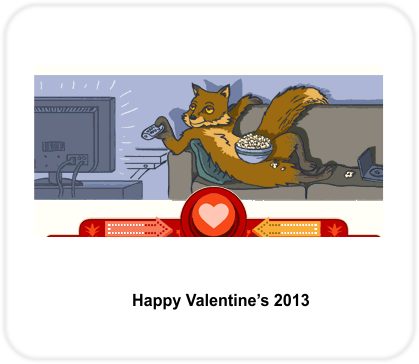
Happy Heart’s Day February 14, 2013. I don’t have a date
right now to bad and just spending my
time on the internet but Google is
celebrating Valentine’s with its
doodle. I still don’t have plans today on how to celebrate it but It’s funny
how the biggest search engine celebrate it. If you log in to the site you’ll
never notice the Google word on the search instead a colourful and wonderful
animation about the celebraton today. G
- is like a rollercoaster OO – is 2 Ferris wheel g – rollercoaster that
forms a letter “g” and le – a famous carnival
February 9, 2013
Google Doodle Snake Game February 9, 2013
Labels:
Google,
Google Chrome

Every visit to Google is fun and today the Google Doodle is
about Snake since Its Chinese New Year and Year of the Snake. The doodle right
now is a simple game it’s a very popular Symbian Game before I remember
when I first got a Nokia Mobile phone the game on the phone is a classic game
that you just need up, down, left and right arrow keys. The goal of the game is
to eat as many power up to make the Snake long. The game score is based on how
long the snake . The Nokia Classic game has different level the popular one is
no border which
February 8, 2013
Counter Strike Portable Troubleshooting
Labels:
Computer Troubleshooting,
Google,
Google Chrome

Since playing the game CS portable on Google Chrome I
haven't encountered a major issue with it. My connection is 3Mbps from Globe
Telecom and the game runs on Google Chrome browser and needs a Unity web
browser for playing the game. The only
problem for CS portable is my notebook that I’m using. Check the
specifications.
System Manufacturer: ASUSTek Computer Inc.
Operating System: Windows 7 Starter 32-bit (6.1, Build 7600)
System Model: 1005HA
February 7, 2013
Google Chrome OZ - Find Your Way To OZ
Labels:
Google,
Google Chrome,
Internet

Its an application from a Google Chrome an interactive journey and consider as Chrome Experiment. I saw the link at the bottom of my Google Homepage I got curious and watch the Miniclip. The clip duration is 2:07 minutes and here are some features. Using your webcam you can create and insert yourself to circus pictures and more.
Called Circus Photo Booth. The next feature is the Music Box by composing your own tune using the mouse cursor. The picture in motion is like other
February 2, 2013
Google Chromebook in the Philippines
Labels:
Google,
Google Chrome

Last year I was waiting for Chromebook to be released in the
Philippines. It’s very affordable and the device has it all If you are into
basic gadgets like browsing Facebook, playing application and doing typing jobs
Google Chromebook is for you. The Chromebook is made by Samsung and I checked
the price last year only $250 dollars or around 10K+ pesos. Here are the
specifications and details why I like Chrome Book. I’m not into high end
laptops and I don’t play massive games that require an expensive video card.
The Chromebook has 11.6
Subscribe to:
Posts (Atom)